Switch (single-thread)
A demonstration of a simple L2 non-learning switch.
- GitHub Link: https://github.com/packetcord/packetcord.io/tree/main/apps/l2_switch
- Topology File: topology_examples/l2_switch.json
Topology diagram
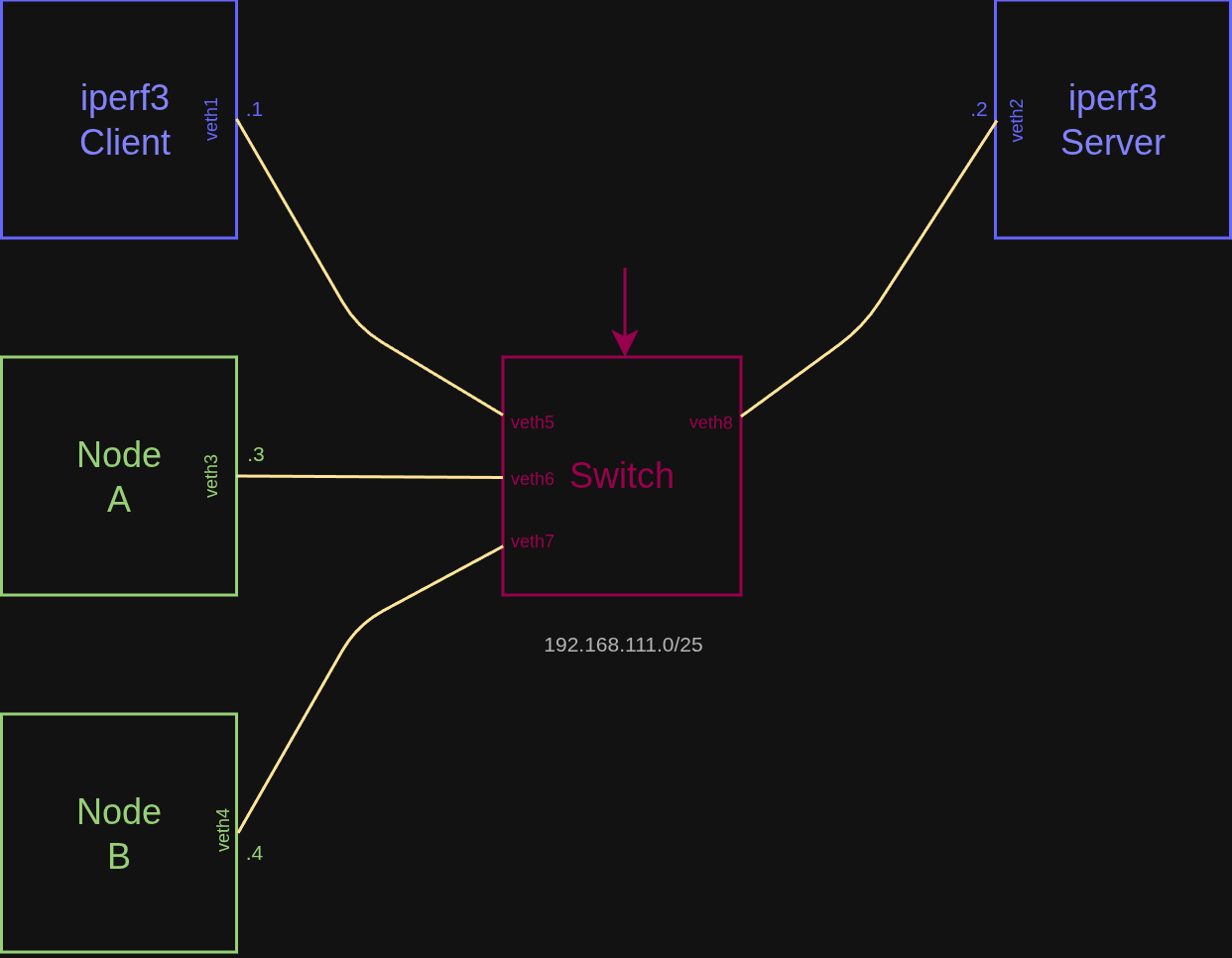
Steps
Build the project (all examples)
Note: You may need to uncomment the static binding inside the CMakeLists.txt file of the examples:
# Link against cord-flow
target_link_libraries(l2_switch_app
    PRIVATE
        cord_flow
        -static # Adding for 'compatibility' when running on Alpile (musl)
)
cd packetcord.io
mkdir build
cd build
cmake .. --fresh
make
Start the topology
Load the exampe topology project file. Then Validate, Generate and Launch the topology.
Inside the shell of Forwarder
./l2_switch_app
Result
Open the shells of Node A and Node B. Try to ping each other (192.168.111.3 and 192.168.111.4).
PING 192.168.111.4 (192.168.111.4): 56 data bytes
64 bytes from 192.168.111.4: seq=0 ttl=64 time=0.094 ms
64 bytes from 192.168.111.4: seq=1 ttl=64 time=0.057 ms
64 bytes from 192.168.111.4: seq=2 ttl=64 time=0.069 ms
64 bytes from 192.168.111.4: seq=3 ttl=64 time=0.103 ms

--- 192.168.111.4 ping statistics ---
4 packets transmitted, 4 packets received, 0% packet loss
round-trip min/avg/max = 0.057/0.080/0.103 ms
Let's also run iperf3 between the other two nodes:
Inside the shell of iperf3 Server
iperf3 -s
Inside the shell of iperf3 Client
iperf3 -c 192.168.111.2
Connecting to host 192.168.111.2, port 5201
[  5] local 192.168.111.1 port 41742 connected to 192.168.111.2 port 5201
[ ID] Interval           Transfer     Bitrate         Retr  Cwnd
[  5]   0.00-1.00   sec   228 MBytes  1.91 Gbits/sec  1369   97.6 KBytes
[  5]   1.00-2.00   sec   245 MBytes  2.05 Gbits/sec  1460    100 KBytes
[  5]   2.00-3.00   sec   244 MBytes  2.05 Gbits/sec  1530   97.6 KBytes
[  5]   3.00-4.00   sec   244 MBytes  2.04 Gbits/sec  1491    102 KBytes
[  5]   4.00-5.00   sec   244 MBytes  2.05 Gbits/sec  1511    100 KBytes
[  5]   5.00-6.00   sec   244 MBytes  2.05 Gbits/sec  1544   99.0 KBytes
[  5]   6.00-7.00   sec   245 MBytes  2.05 Gbits/sec  1425   97.6 KBytes
[  5]   7.00-8.00   sec   244 MBytes  2.05 Gbits/sec  1513    100 KBytes
[  5]   8.00-9.00   sec   245 MBytes  2.06 Gbits/sec  1460    100 KBytes
[  5]   9.00-10.00  sec   245 MBytes  2.06 Gbits/sec  1542    100 KBytes
- - - - - - - - - - - - - - - - - - - - - - - - -
[ ID] Interval           Transfer     Bitrate         Retr
[  5]   0.00-10.00  sec  2.37 GBytes  2.04 Gbits/sec  14845           sender
[  5]   0.00-10.00  sec  2.37 GBytes  2.04 Gbits/sec                  receiver
Note: You may also run some packet capture (tshark, tcpdump) on the nodes to verify that traffic is forwarded properly between the specified source and destination.
Terminate
Use the Destroy button to terminate the emulation.