Post-Installation Setup
In this article we cover the minimum recommended additional packages and extensions required to start developing with the PacketCord SDK.
Ubuntu
Addition packages
Install the following packages related to C programming, debugging and code stylisation:
sudo apt install gcc
sudo apt install gdb
sudo apt install cmake
sudo apt install clang
Pull the latest commits
Navigate to the SDK directory and pull:
cd /home/ubuntu/packetcord/sdk/packetcord.io
git pull
Note: The repository has been cloned by the installer.
Build
Build the SDK using CMake:
mkdir build
cd build
cmake .. --fresh
make
For the examples requiring DPDK dataplane, re-run cmake with the following argument:
cmake -DENABLE_DPDK_DATAPLANE=ON .. --fresh
For the examples requiring XDP dataplane, re-run cmake with the following argument:
cmake -DENABLE_XDP_DATAPLANE=ON .. --fresh
You can now open the project inside the Network Builder IDE using
File --> Open Folder
Select the packetcord.io directory and click Open.
Additional extensions
Inside the Network Builder IDE, we need to install the following extensions:
vscode.git-base
eclipse-cdt.cdt-gdb-vscode
llvm-vs-code-extensions.vscode-clangd
ms-vscode.cmake-tools
vscode.cpp
vscode.git
As a result, your extensions panel should contain the following:
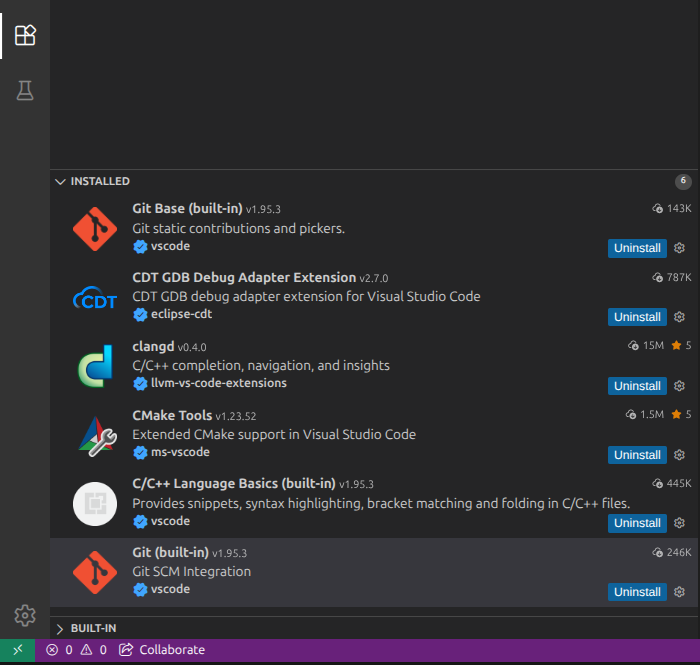
Open some of the example applications and verify that you have the proper syntax highlight and that you can navigate to declarations and definitions.