Installation Guide
A quick guide about installing the Network Builder IDE on Linux.
Ubuntu
Updating packages
sudo apt update
Installing Git
A mandatory component is Git, as our installer automatically clones the PacketCord SDK (also called PacketCord.io as in GitHub) in of the installation steps.
sudo apt install -y git
Installing QtIF dependencies
Install the following packages, required by the Qt Installer Framework:
sudo apt install -y libxkbcommon-x11-0
sudo apt install -y libxcb-icccm4-dev
sudo apt install -y libxcb-image0
sudo apt install -y libxcb-keysyms1
sudo apt install -y libxcb-render-util0
Installing Docker (no sudo)
The topopogy emulation widget requires Docker for the actual node instantiation. Docker must be installed and configured to run in non-sudo mode. One could follow the official documentation here.
Alternatively, execute the below steps:
#
# Install Docker
#

# Add Docker's official GPG key:
sudo apt update
sudo apt install ca-certificates curl
sudo install -m 0755 -d /etc/apt/keyrings
sudo curl -fsSL https://download.docker.com/linux/ubuntu/gpg -o /etc/apt/keyrings/docker.asc
sudo chmod a+r /etc/apt/keyrings/docker.asc

# Add the repository to Apt sources:
sudo tee /etc/apt/sources.list.d/docker.sources <<EOF
Types: deb
URIs: https://download.docker.com/linux/ubuntu
Suites: $(. /etc/os-release && echo "${UBUNTU_CODENAME:-$VERSION_CODENAME}")
Components: stable
Architectures: $(dpkg --print-architecture)
Signed-By: /etc/apt/keyrings/docker.asc
EOF

# Update
sudo apt update

# Install the packages
sudo apt install docker-ce docker-ce-cli containerd.io docker-buildx-plugin docker-compose-plugin

# Start the service
sudo systemctl start docker

# Enable the service
sudo systemctl enable docker

#
# Running as non-sudo/non-root
#

# Create the docker group (it may already be existing)
sudo groupadd docker

# Add your user to the docker group
sudo usermod -aG docker $USER

# Log out or activate the changes to the groups
newgrp docker

# Instantiate the test hello-world container
docker run hello-world

# Check if has been created
docker ps -a

# Remove the test container
docker rm <container>
Note: You can also reboot your PC to verify that Docker will continue operating without sudo.
Running the installer
Download the Network Builder IDE installer from our website link. Then, run it from the shell (without sudo):
# Assuming the installer has been stored inside the default Download directory
cd ~/Downloads
chmod +x cord_nb_ide_installer.bin
./cord_nb_ide_installer.bin
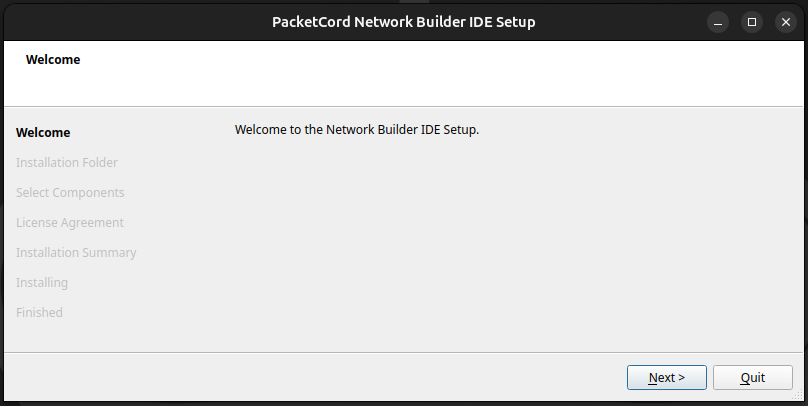
Follow the steps of the installation wizard.
Note: The installer also creates Docker container images and compiles DPDK inside. This may take some time...
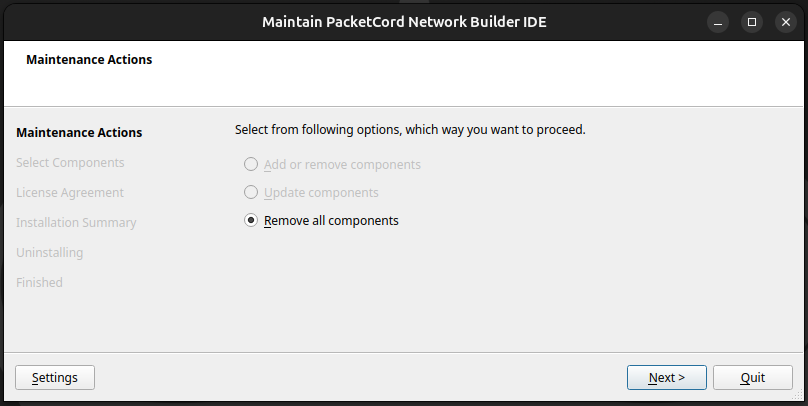
The reverse action (uninstall) is done from the maintenancetool:
# Assuming the IDE has been installed inside /home/ubuntu/packetcord
cd /home/ubuntu/packetcord
./maintenancetool
Installing KiCAD (optional)
Similarly to the topology emulation widget, the hardware builder components integrates with another external software - KiCAD. Below we present the steps to install it:
sudo apt purge --auto-remove kicad
sudo add-apt-repository ppa:kicad/kicad-9.0-releases
sudo apt update
sudo apt install --install-recommends kicad
Note: We highly recommend using KiCAD 9.0.x. The latest KiCAD 10 may have issues with the library management done by the Network Builder IDE installer.
The installer also places the demonstational reusable blocks and snippets inside the target installation directory.
# The target installation directory should be like
/home/ubuntu/packetcord/ide/hw_blocks
Integration with KiCAD from the IDE (optional)
In order to integrate the Network Builder IDE with KiCAD and make those reusable designs accessible by our Hardware Blueprints Builder, follow the below steps.
Accessing the KiCAD configuration files
Go to the .config directory of your user and navigate to the KiCAD directory.
cd ~/.config/kicad/9.0
Note: Work carefully and keep backups of all the files that we are about to manipulate.
Adding the enviroment variable
Inside the kicad_common.json file, add the KICAD_PACKETCORD environment variable. It should become somethink like this:
  "environment": {
    "vars": {
      "KICAD_PACKETCORD": "/home/ubuntu/packetcord/ide/hw_blocks/cord_libs"
    }
  },
Adding the symbols
Inside the sym-lib-table file, append the following (and make sure it is within the tuple):
  (lib (name "24_Pin_Connector_Horizontal")(type "KiCad")(uri "${KICAD_PACKETCORD}/24_Pin_Connector_Horizontal/24_Pin_Connector_Horizontal.kicad_sym")(options "")(descr "PacketCord: 24_Pin_Connector_Horizontal"))
  (lib (name "24_Pin_Connector_Vertical")(type "KiCad")(uri "${KICAD_PACKETCORD}/24_Pin_Connector_Vertical/24_Pin_Connector_Vertical.kicad_sym")(options "")(descr "PacketCord: 24_Pin_Connector_Vertical"))
  (lib (name "25MHZ_OSCILLATOR")(type "KiCad")(uri "${KICAD_PACKETCORD}/25MHZ_OSCILLATOR/25MHZ_OSCILLATOR.kicad_sym")(options "")(descr "PacketCord: 25MHZ_OSCILLATOR"))
  (lib (name "74HC04D")(type "KiCad")(uri "${KICAD_PACKETCORD}/74HC04D/74HC04D.kicad_sym")(options "")(descr "PacketCord: 74HC04D"))
  (lib (name "74HC74D")(type "KiCad")(uri "${KICAD_PACKETCORD}/74HC74D/74HC74D.kicad_sym")(options "")(descr "PacketCord: 74HC74D"))
  (lib (name "ADM2582EBRWZ")(type "KiCad")(uri "${KICAD_PACKETCORD}/ADM2582EBRWZ/ADM2582EBRWZ.kicad_sym")(options "")(descr "PacketCord: ADM2582EBRWZ"))
  (lib (name "ADM3053BRWZ")(type "KiCad")(uri "${KICAD_PACKETCORD}/ADM3053BRWZ/ADM3053BRWZ.kicad_sym")(options "")(descr "PacketCord: ADM3053BRWZ"))
  (lib (name "AMS1117-3.3")(type "KiCad")(uri "${KICAD_PACKETCORD}/AMS1117-3.3/AMS1117-3.3.kicad_sym")(options "")(descr "PacketCord: AMS1117-3.3"))
  (lib (name "AOZ1353DI01")(type "KiCad")(uri "${KICAD_PACKETCORD}/AOZ1353DI01/AOZ1353DI01.kicad_sym")(options "")(descr "PacketCord: AOZ1353DI01"))
  (lib (name "AP7331-10WG")(type "KiCad")(uri "${KICAD_PACKETCORD}/AP7331-10WG/AP7331-10WG.kicad_sym")(options "")(descr "PacketCord: AP7331-10WG"))
  (lib (name "B540C-13-F")(type "KiCad")(uri "${KICAD_PACKETCORD}/B540C-13-F/B540C-13-F.kicad_sym")(options "")(descr "PacketCord: B540C-13-F"))
  (lib (name "BZT52C6V2S-7-F")(type "KiCad")(uri "${KICAD_PACKETCORD}/BZT52C6V2S-7-F/BZT52C6V2S-7-F.kicad_sym")(options "")(descr "PacketCord: BZT52C6V2S-7-F"))
  (lib (name "CAN_TRANS_230")(type "KiCad")(uri "${KICAD_PACKETCORD}/CAN_TRANS_230/CAN_TRANS_230.kicad_sym")(options "")(descr "PacketCord: CAN_TRANS_230"))
  (lib (name "CAN_TRANS_232")(type "KiCad")(uri "${KICAD_PACKETCORD}/CAN_TRANS_232/CAN_TRANS_232.kicad_sym")(options "")(descr "PacketCord: CAN_TRANS_232"))
  (lib (name "CAP_L5")(type "KiCad")(uri "${KICAD_PACKETCORD}/CAP_L5/CAP_L5.kicad_sym")(options "")(descr "PacketCord: CAP_L5"))
  (lib (name "CAP_L6")(type "KiCad")(uri "${KICAD_PACKETCORD}/CAP_L6/CAP_L6.kicad_sym")(options "")(descr "PacketCord: CAP_L6"))
  (lib (name "CAP_TANTAL_A")(type "KiCad")(uri "${KICAD_PACKETCORD}/CAP_TANTAL_A/CAP_TANTAL_A.kicad_sym")(options "")(descr "PacketCord: CAP_TANTAL_A"))
  (lib (name "CAP_TANTAL_B")(type "KiCad")(uri "${KICAD_PACKETCORD}/CAP_TANTAL_B/CAP_TANTAL_B.kicad_sym")(options "")(descr "PacketCord: CAP_TANTAL_B"))
  (lib (name "CD4060")(type "KiCad")(uri "${KICAD_PACKETCORD}/CD4060/CD4060.kicad_sym")(options "")(descr "PacketCord: CD4060"))
  (lib (name "Choke")(type "KiCad")(uri "${KICAD_PACKETCORD}/Choke/Choke.kicad_sym")(options "")(descr "PacketCord: Choke"))
  (lib (name "CMOS_EEPROM")(type "KiCad")(uri "${KICAD_PACKETCORD}/CMOS_EEPROM/CMOS_EEPROM.kicad_sym")(options "")(descr "PacketCord: CMOS_EEPROM"))
  (lib (name "CR2032_HOLDER")(type "KiCad")(uri "${KICAD_PACKETCORD}/CR2032_HOLDER/CR2032_HOLDER.kicad_sym")(options "")(descr "PacketCord: CR2032_HOLDER"))
  (lib (name "CustomJumper")(type "KiCad")(uri "${KICAD_PACKETCORD}/CustomJumper/CustomJumper.kicad_sym")(options "")(descr "PacketCord: CustomJumper"))
  (lib (name "ESD_RS485")(type "KiCad")(uri "${KICAD_PACKETCORD}/ESD_RS485/ESD_RS485.kicad_sym")(options "")(descr "PacketCord: ESD_RS485"))
  (lib (name "Ferrite_Bead_100")(type "KiCad")(uri "${KICAD_PACKETCORD}/Ferrite_Bead_100/Ferrite_Bead_100.kicad_sym")(options "")(descr "PacketCord: Ferrite_Bead_100"))
  (lib (name "HDMI_CONNECTOR")(type "KiCad")(uri "${KICAD_PACKETCORD}/HDMI_CONNECTOR/HDMI_CONNECTOR.kicad_sym")(options "")(descr "PacketCord: HDMI_CONNECTOR"))
  (lib (name "LT8912B")(type "KiCad")(uri "${KICAD_PACKETCORD}/LT8912B/LT8912B.kicad_sym")(options "")(descr "PacketCord: LT8912B"))
  (lib (name "M24C04-RMN6TP")(type "KiCad")(uri "${KICAD_PACKETCORD}/M24C04-RMN6TP/M24C04-RMN6TP.kicad_sym")(options "")(descr "PacketCord: M24C04-RMN6TP"))
  (lib (name "M2_Slot")(type "KiCad")(uri "${KICAD_PACKETCORD}/M2_Slot/M2_Slot.kicad_sym")(options "")(descr "PacketCord: M2_Slot"))
  (lib (name "MicroSD_Holder")(type "KiCad")(uri "${KICAD_PACKETCORD}/MicroSD_Holder/MicroSD_Holder.kicad_sym")(options "")(descr "PacketCord: MicroSD_Holder"))
  (lib (name "MOLEX_8981")(type "KiCad")(uri "${KICAD_PACKETCORD}/MOLEX_8981/MOLEX_8981.kicad_sym")(options "")(descr "PacketCord: MOLEX_8981"))
  (lib (name "NMOS_2N7002")(type "KiCad")(uri "${KICAD_PACKETCORD}/NMOS_2N7002/NMOS_2N7002.kicad_sym")(options "")(descr "PacketCord: NMOS_2N7002"))
  (lib (name "NTZD3154NT1G")(type "KiCad")(uri "${KICAD_PACKETCORD}/NTZD3154NT1G/NTZD3154NT1G.kicad_sym")(options "")(descr "PacketCord: NTZD3154NT1G"))
  (lib (name "PCIE_Switch")(type "KiCad")(uri "${KICAD_PACKETCORD}/PCIE_Switch/PCIE_Switch.kicad_sym")(options "")(descr "PacketCord: PCIE_Switch"))
  (lib (name "PCIE_x16_Slot")(type "KiCad")(uri "${KICAD_PACKETCORD}/PCIE_x16_Slot/PCIE_x16_Slot.kicad_sym")(options "")(descr "PacketCord: PCIE_x16_Slot"))
  (lib (name "PMOS_AO3401A")(type "KiCad")(uri "${KICAD_PACKETCORD}/PMOS_AO3401A/PMOS_AO3401A.kicad_sym")(options "")(descr "PacketCord: PMOS_AO3401A"))
  (lib (name "RJ45_MAGJACK")(type "KiCad")(uri "${KICAD_PACKETCORD}/RJ45_MAGJACK/RJ45_MAGJACK.kicad_sym")(options "")(descr "PacketCord: RJ45_MAGJACK"))
  (lib (name "RJ45_SIMPLE")(type "KiCad")(uri "${KICAD_PACKETCORD}/RJ45_SIMPLE/RJ45_SIMPLE.kicad_sym")(options "")(descr "PacketCord: RJ45_SIMPLE"))
  (lib (name "RS485_TRANS")(type "KiCad")(uri "${KICAD_PACKETCORD}/RS485_TRANS/RS485_TRANS.kicad_sym")(options "")(descr "PacketCord: RS485_TRANS"))
  (lib (name "RTL8367S_CG")(type "KiCad")(uri "${KICAD_PACKETCORD}/RTL8367S_CG/RTL8367S_CG.kicad_sym")(options "")(descr "PacketCord: RTL8367S_CG"))
  (lib (name "RX8010SJ")(type "KiCad")(uri "${KICAD_PACKETCORD}/RX8010SJ/RX8010SJ.kicad_sym")(options "")(descr "PacketCord: RX8010SJ"))
  (lib (name "SFP_CAGE")(type "KiCad")(uri "${KICAD_PACKETCORD}/SFP_CAGE/SFP_CAGE.kicad_sym")(options "")(descr "PacketCord: SFP_CAGE"))
  (lib (name "SFP_Connector")(type "KiCad")(uri "${KICAD_PACKETCORD}/SFP_Connector/SFP_Connector.kicad_sym")(options "")(descr "PacketCord: SFP_Connector"))
  (lib (name "SIM_Holder")(type "KiCad")(uri "${KICAD_PACKETCORD}/SIM_Holder/SIM_Holder.kicad_sym")(options "")(descr "PacketCord: SIM_Holder"))
  (lib (name "SODIMM_DDR4")(type "KiCad")(uri "${KICAD_PACKETCORD}/SODIMM_DDR4/SODIMM_DDR4.kicad_sym")(options "")(descr "PacketCord: SODIMM_DDR4"))
  (lib (name "Tactile_BTN")(type "KiCad")(uri "${KICAD_PACKETCORD}/Tactile_BTN/Tactile_BTN.kicad_sym")(options "")(descr "PacketCord: Tactile_BTN"))
  (lib (name "TPS54331DR")(type "KiCad")(uri "${KICAD_PACKETCORD}/TPS54331DR/TPS54331DR.kicad_sym")(options "")(descr "PacketCord: TPS54331DR"))
  (lib (name "TUSB321RWBR")(type "KiCad")(uri "${KICAD_PACKETCORD}/TUSB321RWBR/TUSB321RWBR.kicad_sym")(options "")(descr "PacketCord: TUSB321RWBR"))
  (lib (name "USB_2_CONNECTOR")(type "KiCad")(uri "${KICAD_PACKETCORD}/USB_2_CONNECTOR/USB_2_CONNECTOR.kicad_sym")(options "")(descr "PacketCord: USB_2_CONNECTOR"))
  (lib (name "USB_ESD")(type "KiCad")(uri "${KICAD_PACKETCORD}/USB_ESD/USB_ESD.kicad_sym")(options "")(descr "PacketCord: USB_ESD"))
  (lib (name "USB_HUB")(type "KiCad")(uri "${KICAD_PACKETCORD}/USB_HUB/USB_HUB.kicad_sym")(options "")(descr "PacketCord: USB_HUB"))
  (lib (name "USB_TYPEC")(type "KiCad")(uri "${KICAD_PACKETCORD}/USB_TYPEC/USB_TYPEC.kicad_sym")(options "")(descr "PacketCord: USB_TYPEC"))
  (lib (name "USB_v3_CONNECTOR")(type "KiCad")(uri "${KICAD_PACKETCORD}/USB_v3_CONNECTOR/USB_v3_CONNECTOR.kicad_sym")(options "")(descr "PacketCord: USB_v3_CONNECTOR"))
  (lib (name "USB_Vertical")(type "KiCad")(uri "${KICAD_PACKETCORD}/USB_Vertical/USB_Vertical.kicad_sym")(options "")(descr "PacketCord: USB_Vertical"))
  (lib (name "USB_VERTICAL_BLUE")(type "KiCad")(uri "${KICAD_PACKETCORD}/USB_VERTICAL_BLUE/USB_VERTICAL_BLUE.kicad_sym")(options "")(descr "PacketCord: USB_VERTICAL_BLUE"))
  (lib (name "XTAL_24MHZ")(type "KiCad")(uri "${KICAD_PACKETCORD}/XTAL_24MHZ/XTAL_24MHZ.kicad_sym")(options "")(descr "PacketCord: XTAL_24MHZ"))
  (lib (name "XTAL_25MHZ")(type "KiCad")(uri "${KICAD_PACKETCORD}/XTAL_25MHZ/XTAL_25MHZ.kicad_sym")(options "")(descr "PacketCord: XTAL_25MHZ"))
Adding the footprints
Inside the fp-lib-table file, append the following (and make sure it is within the tuple):
  (lib (name "24_Pin_Connector_Horizontal")(type "KiCad")(uri "${KICAD_PACKETCORD}/24_Pin_Connector_Horizontal/24_Pin_Connector_Horizontal.pretty")(options "")(descr "PacketCord: 24_Pin_Connector_Horizontal"))
  (lib (name "24_Pin_Connector_Vertical")(type "KiCad")(uri "${KICAD_PACKETCORD}/24_Pin_Connector_Vertical/24_Pin_Connector_Vertical.pretty")(options "")(descr "PacketCord: 24_Pin_Connector_Vertical"))
  (lib (name "25MHZ_OSCILLATOR")(type "KiCad")(uri "${KICAD_PACKETCORD}/25MHZ_OSCILLATOR/25MHZ_OSCILLATOR.pretty")(options "")(descr "PacketCord: 25MHZ_OSCILLATOR"))
  (lib (name "74HC04D")(type "KiCad")(uri "${KICAD_PACKETCORD}/74HC04D/74HC04D.pretty")(options "")(descr "PacketCord: 74HC04D"))
  (lib (name "74HC74D")(type "KiCad")(uri "${KICAD_PACKETCORD}/74HC74D/74HC74D.pretty")(options "")(descr "PacketCord: 74HC74D"))
  (lib (name "ADM2582EBRWZ")(type "KiCad")(uri "${KICAD_PACKETCORD}/ADM2582EBRWZ/ADM2582EBRWZ.pretty")(options "")(descr "PacketCord: ADM2582EBRWZ"))
  (lib (name "ADM3053BRWZ")(type "KiCad")(uri "${KICAD_PACKETCORD}/ADM3053BRWZ/ADM3053BRWZ.pretty")(options "")(descr "PacketCord: ADM3053BRWZ"))
  (lib (name "AMS1117-3.3")(type "KiCad")(uri "${KICAD_PACKETCORD}/AMS1117-3.3/AMS1117-3.3.pretty")(options "")(descr "PacketCord: AMS1117-3.3"))
  (lib (name "AOZ1353DI01")(type "KiCad")(uri "${KICAD_PACKETCORD}/AOZ1353DI01/AOZ1353DI01.pretty")(options "")(descr "PacketCord: AOZ1353DI01"))
  (lib (name "AP7331-10WG")(type "KiCad")(uri "${KICAD_PACKETCORD}/AP7331-10WG/AP7331-10WG.pretty")(options "")(descr "PacketCord: AP7331-10WG"))
  (lib (name "B540C-13-F")(type "KiCad")(uri "${KICAD_PACKETCORD}/B540C-13-F/B540C-13-F.pretty")(options "")(descr "PacketCord: B540C-13-F"))
  (lib (name "BZT52C6V2S-7-F")(type "KiCad")(uri "${KICAD_PACKETCORD}/BZT52C6V2S-7-F/BZT52C6V2S-7-F.pretty")(options "")(descr "PacketCord: BZT52C6V2S-7-F"))
  (lib (name "CAN_TRANS_230")(type "KiCad")(uri "${KICAD_PACKETCORD}/CAN_TRANS_230/CAN_TRANS_230.pretty")(options "")(descr "PacketCord: CAN_TRANS_230"))
  (lib (name "CAN_TRANS_232")(type "KiCad")(uri "${KICAD_PACKETCORD}/CAN_TRANS_232/CAN_TRANS_232.pretty")(options "")(descr "PacketCord: CAN_TRANS_232"))
  (lib (name "CAP_L5")(type "KiCad")(uri "${KICAD_PACKETCORD}/CAP_L5/CAP_L5.pretty")(options "")(descr "PacketCord: CAP_L5"))
  (lib (name "CAP_L6")(type "KiCad")(uri "${KICAD_PACKETCORD}/CAP_L6/CAP_L6.pretty")(options "")(descr "PacketCord: CAP_L6"))
  (lib (name "CAP_TANTAL_A")(type "KiCad")(uri "${KICAD_PACKETCORD}/CAP_TANTAL_A/CAP_TANTAL_A.pretty")(options "")(descr "PacketCord: CAP_TANTAL_A"))
  (lib (name "CAP_TANTAL_B")(type "KiCad")(uri "${KICAD_PACKETCORD}/CAP_TANTAL_B/CAP_TANTAL_B.pretty")(options "")(descr "PacketCord: CAP_TANTAL_B"))
  (lib (name "CD4060")(type "KiCad")(uri "${KICAD_PACKETCORD}/CD4060/CD4060.pretty")(options "")(descr "PacketCord: CD4060"))
  (lib (name "Choke")(type "KiCad")(uri "${KICAD_PACKETCORD}/Choke/Choke.pretty")(options "")(descr "PacketCord: Choke"))
  (lib (name "CMOS_EEPROM")(type "KiCad")(uri "${KICAD_PACKETCORD}/CMOS_EEPROM/CMOS_EEPROM.pretty")(options "")(descr "PacketCord: CMOS_EEPROM"))
  (lib (name "CR2032_HOLDER")(type "KiCad")(uri "${KICAD_PACKETCORD}/CR2032_HOLDER/CR2032_HOLDER.pretty")(options "")(descr "PacketCord: CR2032_HOLDER"))
  (lib (name "CustomJumper")(type "KiCad")(uri "${KICAD_PACKETCORD}/CustomJumper/CustomJumper.pretty")(options "")(descr "PacketCord: CustomJumper"))
  (lib (name "ESD_RS485")(type "KiCad")(uri "${KICAD_PACKETCORD}/ESD_RS485/ESD_RS485.pretty")(options "")(descr "PacketCord: ESD_RS485"))
  (lib (name "Ferrite_Bead_100")(type "KiCad")(uri "${KICAD_PACKETCORD}/Ferrite_Bead_100/Ferrite_Bead_100.pretty")(options "")(descr "PacketCord: Ferrite_Bead_100"))
  (lib (name "HDMI_CONNECTOR")(type "KiCad")(uri "${KICAD_PACKETCORD}/HDMI_CONNECTOR/HDMI_CONNECTOR.pretty")(options "")(descr "PacketCord: HDMI_CONNECTOR"))
  (lib (name "LT8912B")(type "KiCad")(uri "${KICAD_PACKETCORD}/LT8912B/LT8912B.pretty")(options "")(descr "PacketCord: LT8912B"))
  (lib (name "M24C04-RMN6TP")(type "KiCad")(uri "${KICAD_PACKETCORD}/M24C04-RMN6TP/M24C04-RMN6TP.pretty")(options "")(descr "PacketCord: M24C04-RMN6TP"))
  (lib (name "M2_Slot")(type "KiCad")(uri "${KICAD_PACKETCORD}/M2_Slot/M2_Slot.pretty")(options "")(descr "PacketCord: M2_Slot"))
  (lib (name "MicroSD_Holder")(type "KiCad")(uri "${KICAD_PACKETCORD}/MicroSD_Holder/MicroSD_Holder.pretty")(options "")(descr "PacketCord: MicroSD_Holder"))
  (lib (name "MOLEX_8981")(type "KiCad")(uri "${KICAD_PACKETCORD}/MOLEX_8981/MOLEX_8981.pretty")(options "")(descr "PacketCord: MOLEX_8981"))
  (lib (name "NMOS_2N7002")(type "KiCad")(uri "${KICAD_PACKETCORD}/NMOS_2N7002/NMOS_2N7002.pretty")(options "")(descr "PacketCord: NMOS_2N7002"))
  (lib (name "NTZD3154NT1G")(type "KiCad")(uri "${KICAD_PACKETCORD}/NTZD3154NT1G/NTZD3154NT1G.pretty")(options "")(descr "PacketCord: NTZD3154NT1G"))
  (lib (name "PCIE_Switch")(type "KiCad")(uri "${KICAD_PACKETCORD}/PCIE_Switch/PCIE_Switch.pretty")(options "")(descr "PacketCord: PCIE_Switch"))
  (lib (name "PCIE_x16_Slot")(type "KiCad")(uri "${KICAD_PACKETCORD}/PCIE_x16_Slot/PCIE_x16_Slot.pretty")(options "")(descr "PacketCord: PCIE_x16_Slot"))
  (lib (name "PMOS_AO3401A")(type "KiCad")(uri "${KICAD_PACKETCORD}/PMOS_AO3401A/PMOS_AO3401A.pretty")(options "")(descr "PacketCord: PMOS_AO3401A"))
  (lib (name "RJ45_MAGJACK")(type "KiCad")(uri "${KICAD_PACKETCORD}/RJ45_MAGJACK/RJ45_MAGJACK.pretty")(options "")(descr "PacketCord: RJ45_MAGJACK"))
  (lib (name "RJ45_SIMPLE")(type "KiCad")(uri "${KICAD_PACKETCORD}/RJ45_SIMPLE/RJ45_SIMPLE.pretty")(options "")(descr "PacketCord: RJ45_SIMPLE"))
  (lib (name "RS485_TRANS")(type "KiCad")(uri "${KICAD_PACKETCORD}/RS485_TRANS/RS485_TRANS.pretty")(options "")(descr "PacketCord: RS485_TRANS"))
  (lib (name "RX8010SJ")(type "KiCad")(uri "${KICAD_PACKETCORD}/RX8010SJ/RX8010SJ.pretty")(options "")(descr "PacketCord: RX8010SJ"))
  (lib (name "RTL8367S_CG")(type "KiCad")(uri "${KICAD_PACKETCORD}/RTL8367S_CG/RTL8367S-CG.pretty")(options "")(descr "PacketCord: RTL8367S_CG"))
  (lib (name "SFP_CAGE")(type "KiCad")(uri "${KICAD_PACKETCORD}/SFP_CAGE/SFP_CAGE.pretty")(options "")(descr "PacketCord: SFP_CAGE"))
  (lib (name "SFP_Connector")(type "KiCad")(uri "${KICAD_PACKETCORD}/SFP_Connector/SFP_Connector.pretty")(options "")(descr "PacketCord: SFP_Connector"))
  (lib (name "SIM_Holder")(type "KiCad")(uri "${KICAD_PACKETCORD}/SIM_Holder/SIM_Holder.pretty")(options "")(descr "PacketCord: SIM_Holder"))
  (lib (name "SODIMM_DDR4")(type "KiCad")(uri "${KICAD_PACKETCORD}/SODIMM_DDR4/SODIMM_DDR4.pretty")(options "")(descr "PacketCord: SODIMM_DDR4"))
  (lib (name "Tactile_BTN")(type "KiCad")(uri "${KICAD_PACKETCORD}/Tactile_BTN/Tactile_BTN.pretty")(options "")(descr "PacketCord: Tactile_BTN"))
  (lib (name "TPS54331DR")(type "KiCad")(uri "${KICAD_PACKETCORD}/TPS54331DR/TPS54331DR.pretty")(options "")(descr "PacketCord: TPS54331DR"))
  (lib (name "TUSB321RWBR")(type "KiCad")(uri "${KICAD_PACKETCORD}/TUSB321RWBR/TUSB321RWBR.pretty")(options "")(descr "PacketCord: TUSB321RWBR"))
  (lib (name "USB_2_CONNECTOR")(type "KiCad")(uri "${KICAD_PACKETCORD}/USB_2_CONNECTOR/USB_2_CONNECTOR.pretty")(options "")(descr "PacketCord: USB_2_CONNECTOR"))
  (lib (name "USB_ESD")(type "KiCad")(uri "${KICAD_PACKETCORD}/USB_ESD/USB_ESD.pretty")(options "")(descr "PacketCord: USB_ESD"))
  (lib (name "USB_HUB")(type "KiCad")(uri "${KICAD_PACKETCORD}/USB_HUB/USB_HUB.pretty")(options "")(descr "PacketCord: USB_HUB"))
  (lib (name "USB_TYPEC")(type "KiCad")(uri "${KICAD_PACKETCORD}/USB_TYPEC/USB_TYPEC.pretty")(options "")(descr "PacketCord: USB_TYPEC"))
  (lib (name "USB_v3_CONNECTOR")(type "KiCad")(uri "${KICAD_PACKETCORD}/USB_v3_CONNECTOR/USB_v3_CONNECTOR.pretty")(options "")(descr "PacketCord: USB_v3_CONNECTOR"))
  (lib (name "USB_Vertical")(type "KiCad")(uri "${KICAD_PACKETCORD}/USB_Vertical/USB_Vertical.pretty")(options "")(descr "PacketCord: USB_Vertical"))
  (lib (name "USB_VERTICAL_BLUE")(type "KiCad")(uri "${KICAD_PACKETCORD}/USB_VERTICAL_BLUE/USB_VERTICAL_BLUE.pretty")(options "")(descr "PacketCord: USB_VERTICAL_BLUE"))
  (lib (name "XTAL_24MHZ")(type "KiCad")(uri "${KICAD_PACKETCORD}/XTAL_24MHZ/XTAL_24MHZ.pretty")(options "")(descr "PacketCord: XTAL_24MHZ"))
  (lib (name "XTAL_25MHZ")(type "KiCad")(uri "${KICAD_PACKETCORD}/XTAL_25MHZ/XTAL_25MHZ.pretty")(options "")(descr "PacketCord: XTAL_25MHZ"))
Running the IDE
Open the search bar of your Linux desktop environment and type "Network Builder IDE". The topology emulation and hardware blueprint builders can be found inside the View menu:
View --> Hardware Development --> Blueprints Builder
View --> Integration --> Topology Emulation --> Blueprints Builder
There are also examples, located inside the target installation directory:
/home/ubuntu/packetcord/ide/examples/hardware_examples
/home/ubuntu/packetcord/ide/examples/topology_examples
You can also have a look at our YouTube channel for some brief video tutorials regarding the UI navigation and using the examples.